
The Site Manager in LENA Online can add and see all groups within the site. Click here to learn more about the LENA Online Site Manager role.
Account Owners add Site Managers to Sites.
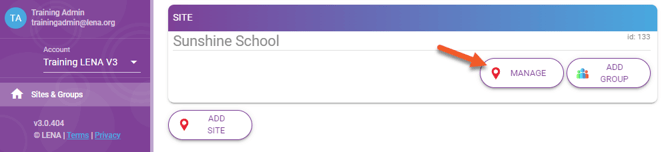
1. Click Manage to open the Site's screen.
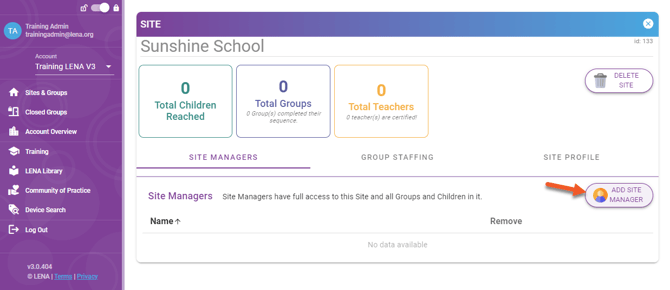
2. On the Site's Site Managers tab, click Add Site Manager.
3. Enter person's information.
-
Brand new user: Enter name and email, click Continue.
-
Existing user: Enter just the first name, click Continue.
4. Review search results
- Select existing user from list, and click Continue.
- If no existing user matches found, click Add new user.
⚠️ If you know the user exists but the search comes up empty, check for a typo, or a changed name or email address. Avoid creating a duplicate user. Add the existing user, and edit the name or address later.
5. Confirm details, then Add User to Site.
What happens next?
- New user: System sends a welcome email with a link to set a password.
- Existing user: No email is sent, but the site will now appear on the person's dashboard.
Site Manager is a LENA Online user role that can:
- View all data in the assigned site.
- Add groups.
- Add coaches to groups.
- Add children and manage device assignments.
Depending on your staff structure, the site manager role could be filled by:
- A coach who works with all groups in the site.
- A regional manager, coordinator, or supervisor.
- Center director or center admin. (This is uncommon, but can be a good choice if your Site Agreement makes the site responsible for printing reports.)