
⚠️ Process all devices that contain data for this group. Do not close the group while they are still doing a LENA Day.
1. On the group's screen, click the Close Group button.
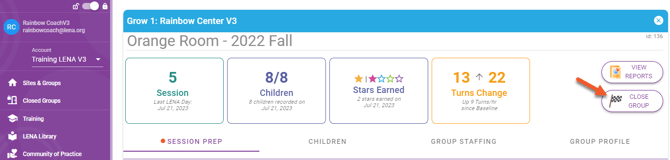
2. Answer closeout questions.
3. Certify teachers who met stated requirements.
👉 Certification cannot be edited after the group is closed.
4. Click Close Group.
- The group moves to the Closed Groups Dashboard.
- The group is eligible for inclusion in your program's Impact Report.
FAQs about closing a LENA Grow Group
When should I close out a LENA Grow Group?
For Grow 1 Essentials and Grow 2 Insights, Session Prep prompts the coach to close the LENA Grow Group just before the final coaching session.
For a Flex group, close the Group whenever you have met your data collection objectives.
Who is responsible for closing out a LENA Grow Group?
Typically the coach closes the Group while preparing for the final coaching session.
What do I do if my Group stopped without completing the planned number of LENA Days?
The group closeout button and form are available any time after the first LENA Day.
Can I reopen a Group after closing it?
If you’ve accidentally closed a Group mid-sequence, please contact suppport@LENA.org. We can help you re-open the Group to continue the same sequence.
My Group decided not to participate. How can I close this group?
You will see either a Delete button or a Close button. Click to remove the Group from the dashboard.