
Course Outline
4. Manage LENA Devices (12 min)
Once families begin LENA Days, LENA devices must be processed between each LENA home visit to ensure families get regular feedback reports.
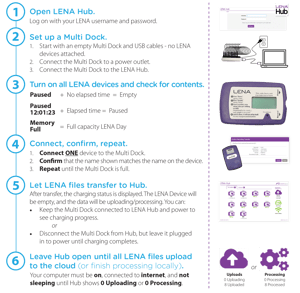
| To the right is an overview of each step to follow when processing LENA devices: devices are connected to a computer with installed LENA Hub software, audio data are transferred via LENA’s secure cloud, then analyzed and turned into a LENA Report. We’ll cover each step in greater detail as you move through this lesson. Download and print a copy to keep by your LENA Hub computer for easy reference. |
 |
Important: Do not go out of order when completing steps! Opening LENA Hub with devices already connected, connecting a full Multi Dock to the computer, or connecting more devices before confirming the assignment on the first device may seem like speedy shortcuts, but typically cause problems instead. Go slow to go fast!
1. Open LENA Hub and log in.
LENA Hub is the transfer software used to upload data from LENA devices. Check with your program manager to ensure LENA Hub is already installed on the computer you will use to process LENA devices. We recommend testing LENA Hub as soon as possible to avoid future delays.
2. Turn on your devices.
3. Set up one Multi Dock (if processing multiple devices).
If you are processing only one device at a time, connect the device directly to a USB port on the LENA Hub computer using a USB cable.
4. Connect devices one at a time to the LENA Hub processing computer.
Important: Wait for and respond to the on-screen message for each device before connecting the next one.
5. Let files transfer from device to Hub.
6. Let all files upload.
After upload, the LENA Day data are analyzed in the cloud. LENA reports will be available by the morning after your uploads complete.
Charge LENA devices for next time.
After each upload, allow devices to charge fully. If your program uses the LENA Multi Dock, leave devices plugged in there. If you are using wall chargers, disconnect the device from your computer and plug it into the wall charger. When the device has charged, store it with the materials you’ll use for the next session with the assigned family.
Watch the video to learn more about the charging process, device battery icons, charging times, and device screen messages.
| Visit the LENA Home Support Site for more detailed processing instructions, plus tips for handling unexpected errors during transfer and upload. Additionally, the LENA Hub Troubleshooting Guide is a great reference for whenever things aren’t working right. Access the support site directly from LENA Hub by clicking the , just as you do in LENA Online. Choose 'LENA Home' from the list of LENA programs. | 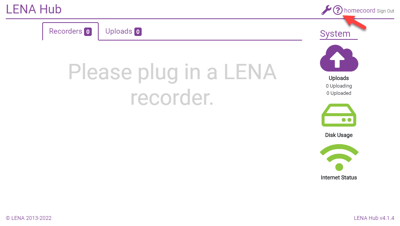 |