
Course Outline
4. Create Your Seasonal Plan (2 min)
Now that you’ve set your launch schedule, it’s time to plan for the whole year by creating a Seasonal Plan! This lesson will help you think about how to get the most out of your yearlong subscription.
- The launch schedule you completed in the previous lesson will be included in your first Seasonal Plan.
- This lesson helps you think about ways to maximize your program potential throughout your yearlong subscription.
| If you already have a plan with LENA, great!. Review it now and note any changes to discuss with your Partner Success Manager. | |
| If you don’t have a Seasonal Plan yet, reflect on the questions provided. During your next call, LENA will help you create a plan that works for your organization. |
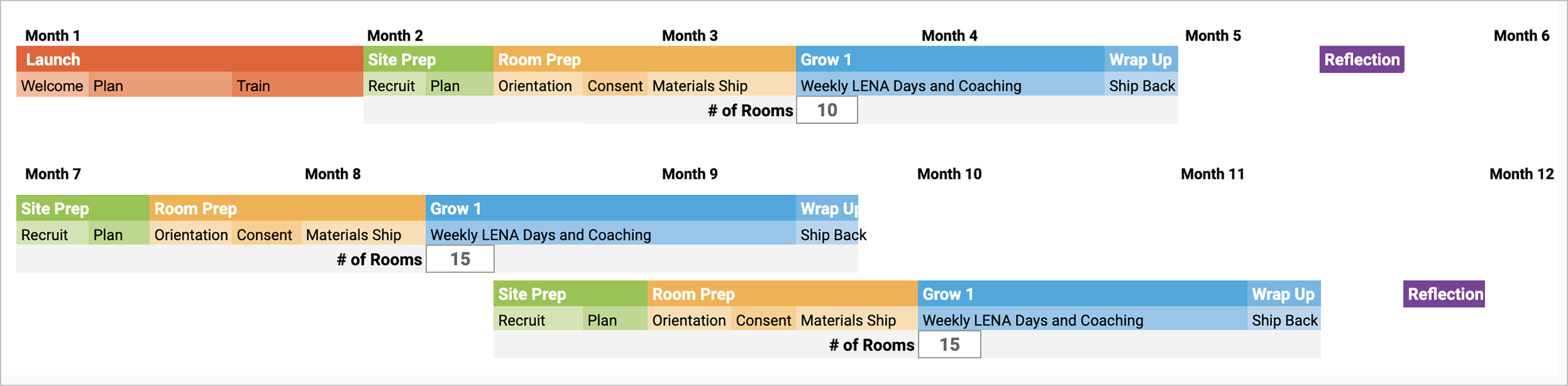
This is an example Seasonal Plan. Your PSM will help customize a plan for you.
LENA recommends completing sequences across multiple seasons. Many partners choose one fall sequence and two spring sequences. As you plan your schedule, think about:
- How many rooms can you use? (check LENA Online.)
- How and when you will recruit sites
- How many coaches do you have?
- How many rooms can each coach serve at once?
- When will each room participate during the year?
- How does LENA Grow fit with other initiatives, like assessments or professional development?

|
If you own your own devices, check how many devices and vests you have. This will affect how many rooms you can serve at the same time. |
Remember:
- You may need to revisit your launch schedule or adjust both schedules together until everything fits your organization’s needs.
- Once your Seasonal Plan is created, you can view it anytime in LENA Online → Account Management → Subscription.
Fill out your Seasonal Schedule in your Planning for LENA Grow worksheet, section 4. Plan Your Seasonal Schedule.