
Course Outline
6. Plan for LENA Online Organization (3 min)
LENA Online helps keep teacher and child data secure and makes it easier to navigate your information. Even though you won’t enter this data until the Site Prep Checklist, it’s important to plan how your LENA Online account will be organized.
Remember: The Account Owner is the only person who can create Sites and add users in LENA Online. Now is a good time to decide if anyone else should be added as an Account Owner.
|
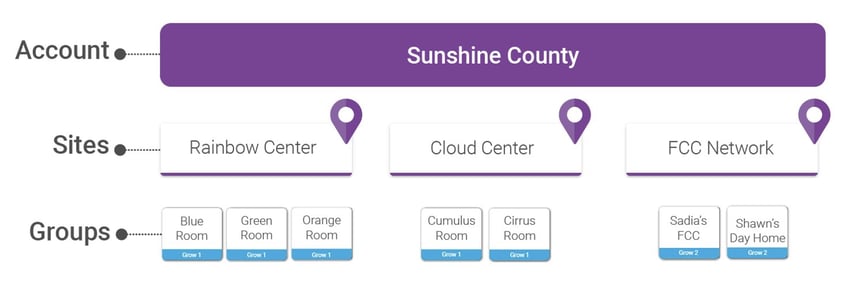
Your LENA Online account is organized into Groups and Sites.
|
|
|
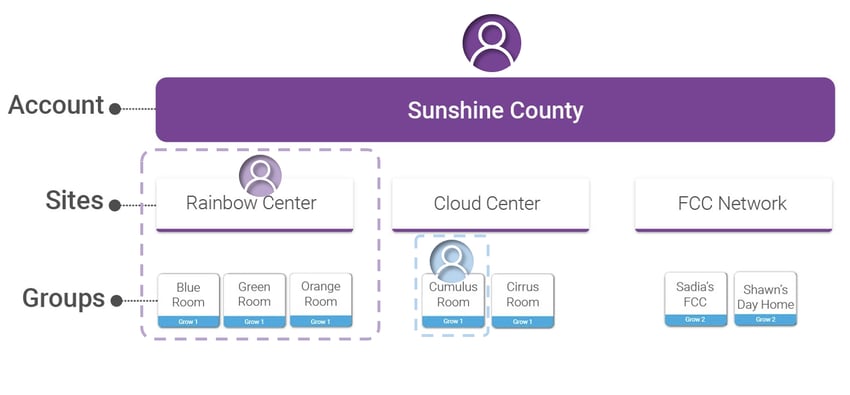
You can add individual users to specific Sites or Groups in LENA Online.
|
|
Answer the question in your Planning for LENA Grow worksheet, section 6. Plan for LENA Online Organization.