
To make a report, LENA data travels...
from child to device, device to dock, dock to cloud, and cloud to LENA Online.
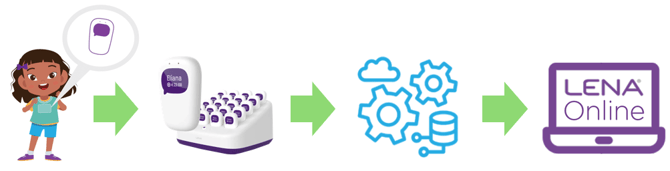
Walk backward through the process to find missing data.

1. Check LENA Online.
Maybe the data is in LENA Online but is unreportable or assigned to the wrong report. The coach can:
- Click on View Report to check for report alerts. If an alert is present, click on More Info for instructions.
- Review the Recordings List for any child you think should have data. (On the roster, click the child's name, then the Recordings tab.) Check for data that is too short (<2 hrs), hidden, associated to a different group, or on the wrong date. LENA Support is available to help investigate and correct as needed.

2. Could the data still be in cloud analysis?
When data is still being analyzed, the report screen shows an alert: Reports in progress.
Cloud analysis can take a few hours. If you believe the files should have finished uploading at least 4 hours ago, move on to the next step to be sure.
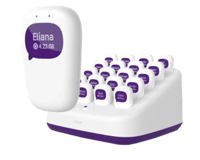
3. Check the dock and devices.
Most "missing" data is found on the dock or devices, because either uploading has not finished, or the dock has lost connectivity. The site staff can:
- Check the dock's network light.
✅ A connected dock has a solid green network light.
🟡 Blinking yellow means it is disconnected. The built-in cellular connection was insufficient. Connect to Wi-Fi so data can upload. - Verify all devices are in the dock, not misplaced elsewhere.
- Press the dock's button for about 1 second to wake the devices.
- Any device that does not wake is probably not fully seated. Press the device firmly into place so that it can connect and upload.
- If the missing children's devices show the wave animation, they are still uploading or waiting to upload. Check again in 20 minutes to verify that at least one uploading device has resolved to Ready status.
- After successful upload, wait 2-4 hours for the reports to fill in.

4. Ask the provider about special circumstances.
An unexpected situation can lead to misassigned, unprocessed, or uncollected data.
-
Ask about attendance, device swaps, child moves, participation issues, or anything unusual that may have happened. Examples include:
- Child changed physical classrooms, but was not moved in LENA Online.
- Contact LENA Support for help locating and moving the report.
- Child changed physical classrooms, but was not moved in LENA Online.
-
- Device was not started because:
- Child was absent.
- Child refused to wear the vest.
- They forgot to start the device.
- They didn't press the device button long enough.
- Device would not turn on or start.
- Device was not started because:
-
- Child used a different child's device for this day.
- Contact LENA Support for help locating and moving the report.
- Child used a different child's device for this day.
Missing data can usually be located through one of the above checks.
If you still believe the report is incomplete, contact LENA Support for assistance tracking down what happened. We will need:
- Site name
- Group name
- Child or children missing data
- Date of missing data