
Contents:
Teacher Certification Requirements
How To Certify a Teacher in LENA Online
Teacher Surveys
Accessing Teacher Certificates
View List of All Certified Teachers
State Professional Development Credits
Certification Troubleshooting
Teacher Certification Requirements
Teacher certification requirements are outlined in the LENA Certified Teacher Tracker in the Teacher Guide. Teachers and Coaches use this form to keep track of participation throughout the sequence.
How To Certify a Teacher in LENA Online
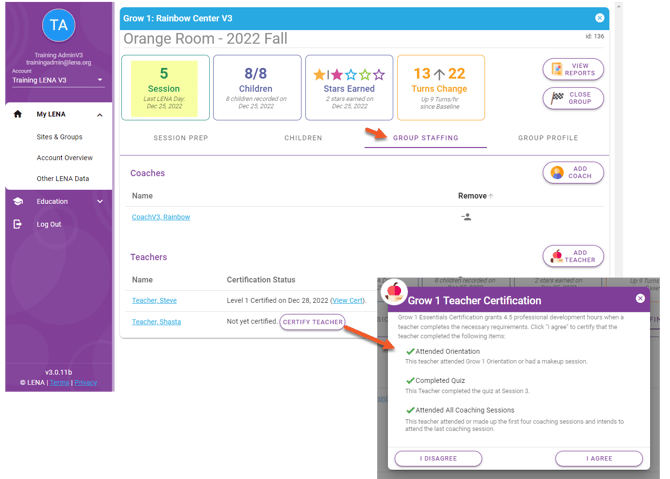
As part of Session Preparation for Coaching Session 5, a group's Coach certifies each teacher who met the requirements during the sequence. There are two options:
Option 1: Certify while closing the group, on the Group Closeout screen.
Option 2: Certify before closing the group, from the Group Staffing tab as shown below.
⚠️ Certification is not available:
- After a group is closed.
- In a group with fewer than five LENA Days.
- In a Flex group.
Teacher Survey
At the end of the sequence, teachers complete a 10-minute survey about their experience. Individuals' responses are not reported, but the aggregated data becomes part of the program's Impact Report.
Accessing the Survey
- The Session 5 reports include a unique QR code for each teacher. The code links to the Teacher Survey for that sequence. The survey is available in English and Spanish. The teacher can switch languages on the first screen of the survey.
- In case a QR code is not preferred, LENA also emails a survey link to each teacher. The email is sent the day after LENA Day 5 is processed. If not completed, it is sent again the day after the group is closed. The email is bilingual (English/Spanish) and contains a link in each language.
- Tips on what to do if a teacher does not receive a survey link are here.
Note for Teachers With Shared Email Addresses
If multiple teachers use the same email address, the system still sends one email message per teacher. Each message mentions the corresponding teacher by name, and contains a link specific to that teacher. Whoever monitors the inbox must distribute the correct links to the correct teachers.
Alternatively, use the unique QR codes instead, from the final session's report stack.
Accessing teacher certificates
Teacher certificates are available in LENA Online indefinitely, from within any group the teacher is associated with.
- For all teachers in a group use View Reports.
- To view all past certificates for one teacher go to the Group Staffing tab in any group the teacher participated in. Certificates for that group are listed there, or click the teacher's name to see all their certificates on the Certifications tab.
To print or save a certificate from a LENA Online screen:
- Hit Ctrl+P, or right-click on the report to select Print.
- Choose destination.
- Choose a printer to print the certificate.
- Choose one of the PDF options to save to your computer as a PDF that you can later attach to an email.
View list of all certified teachers
Account Owners can select the Teachers page of the Impact Report to show a list of all teachers certified for the dates and sites of interest. This page shows the group name, sequence type, whether a survey was completed, and the certification date.
State Professional Development Credits
LENA Grow is approved for PD credit in some states. Refer to the list below to understand how you might receive credit in your state. For information on credit for coaches visit LENA Grow Training for Program Managers and Coaches.
Certification troubleshooting
Certify button does not appear for teachers on Group Staffing tab.
- The certify button only appears after LENA Day 5 for an open group. A teacher cannot be certified before LENA Day 5 has been processed.
Forgot to certify teachers before closing group.
- Please contact support@lena.org for assistance.
Teacher did not receive survey email.
- If a teacher does not receive their survey email, it's usually for one of these reasons:
- Incorrect email address in LENA Online, so the email was misdirected.
- Teacher was added after LENA Day 5 was processed, so the system did not send.
- Teacher checked the wrong email account (e.g., personal instead of work).
- Email went to a folder like junk, other, clutter, or spam instead of into the inbox.
- Consider using the QR code instead.
Note: If the teacher's email address is incorrect in LENA Online, please correct it and then contact support@lena.org for assistance with the survey link.
Teacher's certification(s) from a previous group are not listed.
- This happens if the teacher was accidentally duplicated in their second group by way of a typo or other data entry error. Please contact support@lena.org for assistance, as duplication may reduce the number of rooms available on your subscription.